Questions fréquentes
Tout ce que vous devez savoir sur Telemiq.
Qu’est-ce que Telemiq ?
Telemiq est une plateforme de récompenses exploitée par Telemiq, avec des solutions TI fournies par Summit Pixels Inc., qui récompense les propriétaires de Tesla pour la recharge de leur véhicule à domicile. Nous nous connectons à votre Tesla par l’API Fleet officielle, vérifions vos sessions de recharge à domicile et vous créditons 5 points forfaitaires par kilowatt-heure. Les utilisateurs de Wall Connector gagnent automatiquement ; les autres configurations appariant la clé virtuelle de télémétrie. C’est aussi simple que ça.
Comment ça marche ?
Connectez votre compte Tesla, définissez votre lieu de domicile et rechargez à la maison comme d’habitude. Telemiq détecte automatiquement vos sessions de recharge, vérifie qu’elles ont lieu à votre adresse domiciliaire enregistrée au moyen du géorepérage GPS et crédite vos points. Les points s’accumulent tout au long de l’année. Une fois l’audit annuel des crédits carbone terminé au T1 de l’année suivante, vos points vérifiés deviennent remboursables en argent par transfert Interac.
Qui peut s’inscrire ?
Tout résident canadien de 18 ans ou plus qui possède ou loue un véhicule Tesla. Vous aurez besoin d’un compte Tesla actif et d’un compte bancaire canadien acceptant les transferts Interac. Ces deux conditions sont nécessaires pour vérifier vos données de recharge et vous envoyer vos récompenses.
Est-ce gratuit ?
Oui, Telemiq est entièrement gratuit à joindre et à utiliser. Aucun frais d’abonnement, aucun frais caché, aucun coût pour retirer vos gains. Nous gagnons des revenus par l’agrégation de crédits carbone en vertu du Règlement sur les carburants propres du Canada, ce qui finance vos récompenses.
Le service est-il disponible hors du Canada ?
Actuellement, Telemiq n’est disponible qu’aux résidents canadiens. Notre agrégation de crédits carbone fonctionne en vertu du Règlement sur les carburants propres (RCP) du Canada, et notre système de paiement utilise le transfert Interac, un service bancaire canadien. Nous pourrons nous étendre à d’autres marchés à l’avenir.
Combien est-ce que je gagne ?
Vous gagnez jusqu’à 5 points par kilowatt-heure (kWh) vérifié de recharge à domicile (cinq paliers annuels versent 5/7/9,5/12/14,5 pts/kWh de base selon vos kWh de l’année civile, multipliés par votre bonus de parrainage (jusqu’à 1,50× — max 21,75 pts/kWh). Chaque 100 points vaut 1,00 $ CA. Par exemple, si vous rechargez 40 kWh en une semaine, vous gagnez 160 points (1,60 $ CA) en mode standard. Un propriétaire de Tesla moyen qui recharge à domicile peut s’attendre à gagner environ 600 à 1 200 points par mois selon ses habitudes de conduite.
Quand les récompenses apparaissent-elles dans mon compte ?
Les récompenses sont généralement créditées dans les 24 à 48 heures après la fin d’une session de recharge ayant passé la vérification. Pendant les périodes de pointe ou les fenêtres de maintenance, un léger délai est possible. Les points apparaissent dans votre solde comme « en attente de vérification » jusqu’à la fin de l’audit annuel des crédits carbone au T1 (janvier–mars de l’année suivante). Vous recevez une notification chaque fois qu’une récompense est créditée.
Qu’est-ce qui compte comme recharge à domicile ?
La recharge à domicile signifie recharger votre Tesla à votre adresse domiciliaire enregistrée. La session doit se produire à l’intérieur de la limite de votre géorepère (rayon de 500 m). Vous êtes admissible aux récompenses si : (1) un Tesla Wall Connector est enregistré dans votre compte, OU (2) la télémétrie Fleet est appariée (clé virtuelle) et votre lieu de domicile est défini dans Paramètres > Lieu de domicile. Les sessions sur Tesla Wall Connector ( Gén 3 / Universal) et sur Mobile Connector gagnent des points lorsque les conditions d’admissibilité sont remplies — taux de paliers annuels de 5 à 14,5 pts/kWh de base. Telemiq est la seule plateforme de récompenses de recharge VE qui prend en charge à la fois les utilisateurs de Wall Connector et de Mobile Connector. ⚠️ Si vous utilisez un Mobile Connector, vous devez apparier la clé virtuelle de télémétrie et définir votre lieu de domicile pour être admissible. ⚠️ Si vous utilisez une borne non Tesla (ChargePoint, FLO, etc.) ayant son propre programme de crédits carbone, ce fournisseur a peut-être déjà réclamé des crédits pour vos sessions — les mêmes données ne peuvent pas être utilisées par deux programmes. Le système de gestion de batterie (BMS) du véhicule agit comme le sous-compteur accrédité, fournissant des données énergétiques infalsifiables directement à notre serveur. Seules les recharges à moins de 500 m de votre adresse domiciliaire enregistrée gagnent des récompenses — les bornes Level 2 publiques loin du domicile, la recharge au travail et les sessions Superchargeur/DC rapide n’en gagnent pas.
Comment les récompenses sont-elles calculées ?
L’énergie livrée (en kWh) de chaque session vérifiée est multipliée par votre taux applicable : taux de palier annuel × multiplicateur de parrainage. Le palier marginal signifie qu’une session peut chevaucher deux paliers — les kWh de chaque tranche gagnent le taux de cette tranche. Le résultat est ajouté à votre solde Telemiq en points entiers — aucun calcul à virgule flottante. Vous pouvez consulter le détail des points de chaque session dans votre historique de transactions.
Y a-t-il un montant maximal que je peux gagner ?
Il n’y a aucune limite supérieure à vos gains. Vos récompenses sont directement proportionnelles à la quantité d’énergie que vous rechargez à domicile. Plus vous rechargez à la maison, plus vous gagnez de points.
Mes récompenses expirent-elles ?
Non, vos récompenses n’expirent jamais. Votre solde gagné demeurera dans votre compte jusqu’à ce que vous choisissiez de le retirer. Cependant, les points doivent être vérifiés par l’audit annuel des crédits carbone du T1 (janvier–mars de l’année suivante) avant de pouvoir être retirés. Il n’y a pas de délai pour atteindre le seuil minimal de retrait.
Mes données Tesla sont-elles en sécurité ?
Votre vie privée est protégée par conception. Telemiq utilise l’API Tesla Fleet officielle avec OAuth 2.0 PKCE — vous vous authentifiez directement auprès de Tesla et nous ne recevons qu’un jeton à accès limité. Tous les jetons sont chiffrés au moyen d’AES-256-GCM avant stockage. Vos données servent exclusivement à la conformité au RCP et au calcul de vos versements ; elles ne sont jamais vendues, partagées ou détournées. La position GPS n’est collectée que pendant la recharge active pour la vérification du domicile, et n’est jamais conservée lorsque le véhicule est inactif ou en veille.
Quelles données accédez-vous depuis mon Tesla ?
Nous n’accédons qu’à ce qui est nécessaire pour vérifier la recharge à domicile et émettre les récompenses : le numéro d’identification du véhicule (VIN) pour lier le compte, les données des sessions de recharge (énergie livrée et horodatage) et les coordonnées GPS pendant la recharge active pour la vérification du géorepère. Nous n’accédons ni à vos données de conduite, ni à la caméra intérieure, ni aux commandes du véhicule. La position GPS est collectée au maximum toutes les 15 minutes, seulement lorsque le véhicule est éveillé et en recharge active — hors recharge ou en veille, aucune donnée de position n’est conservée. Voir la section 2.8 de notre politique de confidentialité pour tous les détails sur la rétention GPS limitée à la recharge.
Puis-je déconnecter mon Tesla en tout temps ?
Oui. Vous pouvez révoquer l’accès de Telemiq en tout temps directement depuis votre compte Tesla. Le plus rapide : dans l’application Tesla, appuyez sur le menu (☰) → votre nom → Sécurité et confidentialité → Applications tierces → Telemiq → icône ⧉ → Retirer l’accès. Ou sur le web : tesla.com → Paramètres du compte → Sécurité → Applications tierces → Telemiq → Gérer → Retirer l’accès. Cela invalide immédiatement nos jetons d’accès et arrête toute synchronisation. Vous pouvez vous reconnecter plus tard si vous souhaitez reprendre le service.
Comment révoquer l’accès de Telemiq depuis mon compte Tesla ?
Le plus rapide : dans l’application Tesla, appuyez sur le menu (☰) → votre nom → Sécurité et confidentialité → Applications tierces → Telemiq → icône ⧉. Ou sur le web : tesla.com → Paramètres du compte → Sécurité → Applications tierces, trouvez Telemiq dans la liste et cliquez sur Gérer pour déconnecter ou révoquer l’accès. Cela invalide immédiatement nos jetons. Aucune action n’est requise dans l’appli Telemiq — vos données cesseront de se synchroniser automatiquement.
Comment connecter ma borne à Telemiq ?
Touchez « Connecter avec Tesla » sur la page Connecter. Vous serez redirigé vers le portail de connexion officiel de Tesla (auth.tesla.com) où vous vous authentifiez directement auprès de Tesla. Après avoir accordé la permission, vos bornes et véhicules sont détectés automatiquement. Tout le processus prend moins d’une minute si votre borne est déjà liée à votre compte Tesla.
Puis-je connecter plusieurs bornes ?
Oui, Telemiq prend en charge plusieurs Wall Connectors sur un même compte. Si vous avez plus d’un Tesla Wall Connector enregistré dans votre compte Tesla, ils apparaîtront tous sur la page Connecter après le liaison. Chaque borne est suivie indépendamment, et toutes les sessions de recharge à domicile depuis n’importe quelle borne connectée sont admissibles aux récompenses.
Mon Wall Connector n’apparaît pas sur la page Connecter.
C’est généralement l’une de trois choses : le Wi-Fi, l’appariement dans l’appli Tesla, ou la liaison Telemiq. Commencez ici : (1) Ouvrez l’appli Tesla → votre véhicule → Mon domicile. Le Wall Connector doit d’abord y apparaître ; sinon, la borne n’est pas enregistrée dans votre compte Tesla. (2) Confirmez que la borne est en Wi-Fi. Le Wall Connector doit être en ligne pour se synchroniser. (3) Une fois qu’il apparaît dans Tesla, reconnectez votre compte Tesla dans les paramètres Telemiq. Les nouvelles bornes peuvent prendre jusqu’à 24 heures à apparaître après l’enregistrement. S’il n’apparaît toujours pas après ce délai, contactez-nous à [email protected].

J’ai connecté ma borne et rechargé mon Tesla, mais je ne vois aucune donnée sur la page Recharge.
Les données de recharge sont généralement synchronisées dans les 24 heures suivant la fin d’une session. D’abord, vérifiez que la session apparaît dans votre appli Tesla sous « Historique de charge ». Assurez-vous que votre borne porte le badge PROPRIÉTAIRE sur la page Connecter — seules les bornes enregistrées par le propriétaire gagnent des récompenses. Si les données n’apparaissent toujours pas après 24 heures, contactez-nous à [email protected].
Pourquoi dois-je connecter mon véhicule au programme ?
Nous devons vérifier certains paramètres du véhicule (marque, modèle, VIN) pour la conformité réglementaire au Règlement sur les carburants propres du Canada. La connexion de votre véhicule nous permet de détecter automatiquement les sessions de recharge et de vérifier qu’elles ont eu lieu à votre adresse domiciliaire enregistrée, éliminant le besoin de déclarations manuelles.
Comment Telemiq se connecte-t-il à mon compte Tesla ?
Telemiq se connecte par le portail d’authentification officiel de Tesla. Quand vous touchez « Connecter avec Tesla », vous êtes redirigé vers auth.tesla.com où vous vous connectez directement avec vos identifiants Tesla. Telemiq ne voit ni ne stocke jamais votre mot de passe Tesla — nous ne recevons qu’un jeton à accès limité via le protocole OAuth 2.0 avec chiffrement PKCE. Vous pouvez révoquer l’accès en tout temps depuis les paramètres de votre compte Tesla.
Quelles permissions Telemiq demande-t-il à mon compte Tesla ?
Telemiq demande neuf portées OAuth : cinq portées d'authentification/identité et quatre permissions de données en lecture seule qui alimentent le programme. AUTHENTIFICATION ET IDENTITÉ : (1) openid et (2) offline_access — connexion et jeton de rafraîchissement qui maintient votre connexion active (OAuth standard; aucun accès aux données); (3) profile, (4) email et user_data — le nom et le courriel de votre compte Tesla, utilisés UNIQUEMENT pour créer et identifier votre compte Telemiq : votre nom apparaît sur votre carte de membre et votre courriel reçoit les liens de connexion et les avis de paiement. Rien n'est jamais publié ni envoyé en votre nom. DONNÉES (LECTURE SEULE) : (5) Renseignements du véhicule (vehicle_device_data) — les données de recharge en direct du véhicule (kWh, puissance, état de charge), ainsi que le NIV/la marque/le modèle que nous devons vérifier pour la conformité au RCP; (6) Position du véhicule (vehicle_location) — coordonnées GPS pour vérifier que la recharge a lieu à votre adresse domiciliaire enregistrée (exigence de conformité au RCP); (7) Renseignements des produits énergétiques (energy_device_data) — état en direct du Wall Connector; (8) Gestion de la recharge du véhicule (vehicle_charging_cmds) — votre historique officiel des sessions de recharge Tesla (heures de début/fin, kWh par session), utilisé pour vérifier et corriger vos relevés de session afin que vos récompenses correspondent toujours à l'énergie réellement livrée. Important : vehicle_charging_cmds porte le nom « commandes », mais pour Telemiq elle est strictement en lecture seule — nous n'envoyons jamais de commandes de charge ou de contrôle à votre véhicule; cette capacité reste la vôtre seule. Telemiq ne peut contrôler votre véhicule d'aucune façon — nous lisons seulement les données de recharge. Vous pouvez examiner et révoquer l'accès en tout temps dans les paramètres de votre compte Tesla.
Qu’est-ce que la clé virtuelle de télémétrie (clé numérique) ?
La clé virtuelle de télémétrie est une autorisation numérique qui permet à votre Tesla de transmettre directement ses données de recharge en temps réel au serveur de Telemiq. Elle s’apparie par le système officiel de clés d’appli de Tesla (https://www.tesla.com/_ak/www.telemiq.io). Une fois appariée, votre véhicule transmet continuellement ses données de recharge — même en veille — sans que Telemiq ait à interroger répétitivement l’API Tesla. C’est distinct de votre connexion OAuth : la connexion OAuth nous permet de demander des données aux serveurs de Tesla, tandis que la clé virtuelle laisse votre véhicule nous pousser les données directement. Les utilisateurs de Mobile Connector doivent apparier la clé virtuelle pour gagner des récompenses. Les utilisateurs de Wall Connector sont déjà admissibles — la télémétrie est facultative mais recommandée pour une détection plus rapide. La clé virtuelle doit être approuvée individuellement pour chaque véhicule du compte.
Pourquoi dois-je lier la clé virtuelle de télémétrie ?
La clé virtuelle de télémétrie remplit trois fonctions essentielles : (1) Détection automatique des sessions — votre véhicule nous pousse les données de recharge en temps réel, donc les sessions sont détectées en quelques minutes plutôt qu’en heures. (2) Conformité au RCP — le système de gestion de batterie (BMS) du véhicule agit comme sous-compteur accrédité, fournissant des lectures d’énergie infalsifiables qui satisfont aux exigences du Règlement sur les carburants propres d’Environnement et Changement climatique Canada. Le flux de télémétrie fournit la piste de données prête pour audit nécessaire à la vérification des crédits. (3) Fonctionne en veille — les flux de télémétrie continuent même quand le véhicule est stationné et endormi, avec une décharge de batterie quasi nulle. Les utilisateurs de Wall Connector sont automatiquement admissibles sans télémétrie. Les utilisateurs de Mobile Connector doivent apparier la clé virtuelle — sans elle, des sessions peuvent être manquées ou retardées.
Quelles données la clé virtuelle de télémétrie accède-t-elle ?
La clé virtuelle accorde un accès en lecture seule à ces flux de données spécifiques : (1) État de charge — si le véhicule est branché, en recharge active, et le taux de charge en kW. (2) État de charge de la batterie (SOC) — le pourcentage avant, pendant et après la recharge. (3) Énergie livrée — total des kWh ajoutés pendant une session. (4) Position du véhicule (GPS) — coordonnées enregistrées au maximum toutes les 15 minutes, seulement quand le véhicule est éveillé et en recharge. Hors recharge, les données GPS sont immédiatement détruites et jamais stockées. (5) Compteur kilométrique — pour les rapports de conformité. (6) État de connectivité du véhicule — en ligne, en veille ou hors ligne. Telemiq n’accède PAS aux données de conduite, aux itinéraires, aux vitesses, à la caméra intérieure, à la pression des pneus, à l’historique des trajets, ni à aucune donnée quand vous ne rechargez pas. Le GPS hors recharge est détruit dès réception — nous ne construisons jamais un historique des déplacements de votre véhicule.
Telemiq peut-il contrôler ma voiture via la clé virtuelle ?
Absolument pas. La clé virtuelle est strictement en lecture seule — elle permet seulement à votre véhicule d’envoyer des données VERS notre serveur. Telemiq ne peut pas déverrouiller les portières, démarrer le véhicule, activer la climatisation, klaxonner, ouvrir le coffre, ni émettre quelque commande que ce soit. La portée vehicle_charging_cmds de notre accès API sert uniquement à LIRE votre historique officiel de recharge Tesla pour la vérification des relevés — malgré son nom, nous n’invoquons jamais de commande de recharge. La clé existe uniquement pour recevoir des données de recharge. Vous pouvez le vérifier vous-même : le système de clés virtuelles de Tesla montre clairement les permissions de chaque clé, et celle de Telemiq est listée comme clé de télémétrie/données, pas comme clé de conduite.
En quoi la clé virtuelle de télémétrie diffère-t-elle de ma connexion OAuth Tesla ?
Ce sont deux choses distinctes qui travaillent ensemble : (1) La connexion OAuth (quand vous touchez « Connecter avec Tesla » et saisissez vos identifiants sur auth.tesla.com) autorise Telemiq à demander des données aux serveurs de Tesla par appels API. C’est un modèle par traction — nous demandons vos données à Tesla. (2) La clé virtuelle de télémétrie (appariée via https://www.tesla.com/_ak/www.telemiq.io) autorise votre véhicule à pousser ses données directement à notre serveur en temps réel. C’est un modèle par poussée — votre voiture nous envoie les données automatiquement. Les deux sont nécessaires : la connexion OAuth identifie votre compte et vos véhicules, tandis que la clé virtuelle active le flux de télémétrie rapide et fiable qui alimente la détection automatique des sessions et le crédit des récompenses.
Comment retirer la clé virtuelle de télémétrie ?
Vous pouvez retirer la clé virtuelle en tout temps depuis votre appli Tesla : allez à votre véhicule, touchez Gérer, puis Serrures, trouvez la clé « www.telemiq.io » et retirez-la. Vous pouvez aussi gérer les clés via Compte Tesla > Sécurité sur le web. Le retrait de la clé arrête immédiatement tout flux de télémétrie — votre véhicule ne poussera plus de données à Telemiq. Votre connexion OAuth reste active, donc nous pouvons toujours interroger l’API pour les données de recharge, mais les sessions peuvent être détectées avec des délais. Pour une déconnexion complète, révoquez Telemiq dans Paramètres du compte → Sécurité → Applications tierces sur le web.
Accédez-vous à ma consommation d’énergie résidentielle ?
Non. Telemiq ne reçoit que les données de votre Tesla Wall Connector et de votre véhicule connectés — précisément l’énergie des sessions de recharge (kWh), l’horodatage et les coordonnées GPS pendant la recharge. Nous n’avons aucun accès à votre compteur électrique résidentiel, à vos factures de services publics ni à votre consommation globale d’énergie domestique. Votre consommation domestique reste entièrement privée.
Comment révoquer l’accès de Telemiq depuis mon compte Tesla ?
Connectez-vous à Tesla sur le web uniquement (pas l’appli). Allez à https://www.tesla.com/en_ca/, puis Paramètres du compte → Sécurité → Applications tierces, trouvez Telemiq dans la liste et cliquez sur Gérer pour déconnecter ou révoquer l’accès. Cela invalide immédiatement nos jetons. Aucune action n’est requise dans l’appli Telemiq — vos données cesseront de se synchroniser automatiquement.
Pourquoi mon tableau de bord me demande-t-il de mettre à jour les permissions Tesla ?
Si votre compte Tesla manque une permission que nous avons demandée (le plus souvent vehicle_location), nous ne pouvons pas vérifier que votre véhicule recharge à votre adresse domiciliaire enregistrée. Sans preuve GPS, les sessions de recharge ne peuvent pas gagner de récompenses (exigence de conformité aux crédits carbone). À noter : Telemiq n'enregistre jamais une autorisation partielle — s'il manque UNE seule portée demandée, la connexion échoue avec un message « permissions manquantes » et rien n'est stocké, afin de protéger votre compte d'une connexion dégradée en silence. Pour corriger : allez à Paramètres Telemiq → Reconnecter le compte Tesla, et assurez-vous que TOUTES les cases de permission sont cochées sur l’écran de consentement Tesla. Si la reconnexion ne fonctionne pas, mettez d’abord à jour l’accès chez Tesla (voir le guide complet ci-dessous), puis reconnectez-vous via Telemiq.
Comment mettre à jour les permissions Telemiq ou reconnecter mon compte Tesla ? (Guide complet)
Si une permission Telemiq manque — ou qu’on vous a demandé de vous reconnecter — mettez à jour votre autorisation directement auprès de Tesla, puis reconnectez-vous dans Telemiq.
Depuis l’application Tesla (le plus simple)
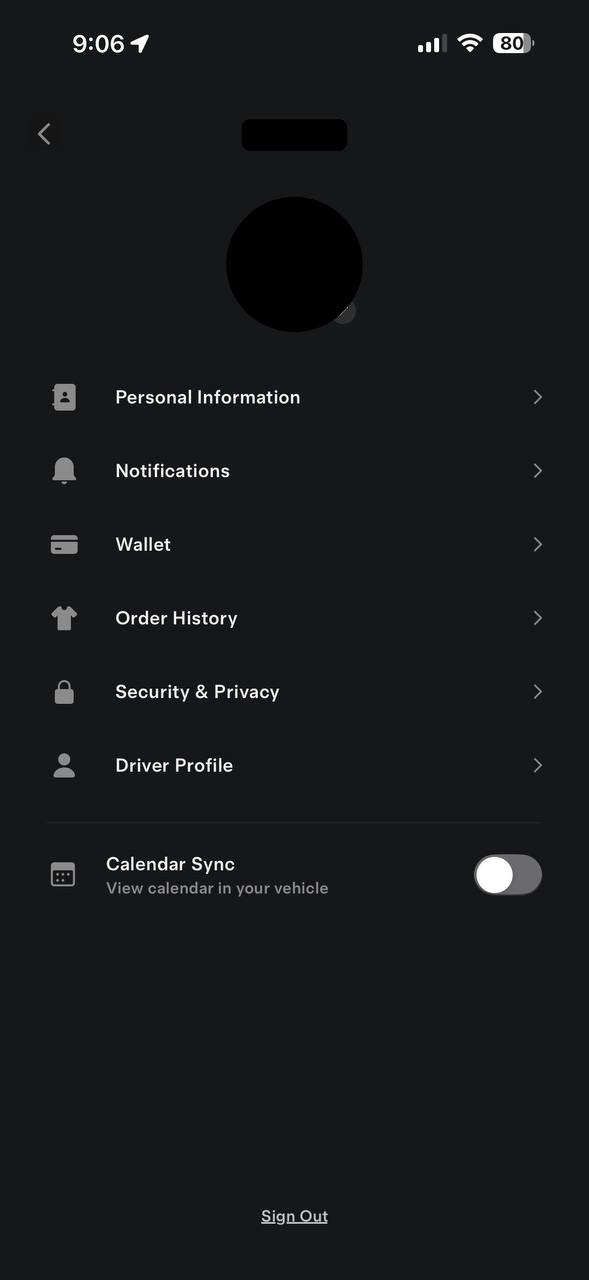
- Ouvrez l’application Tesla et appuyez sur le menu (☰) en haut à droite.
- Appuyez sur votre nom en haut pour ouvrir votre profil.
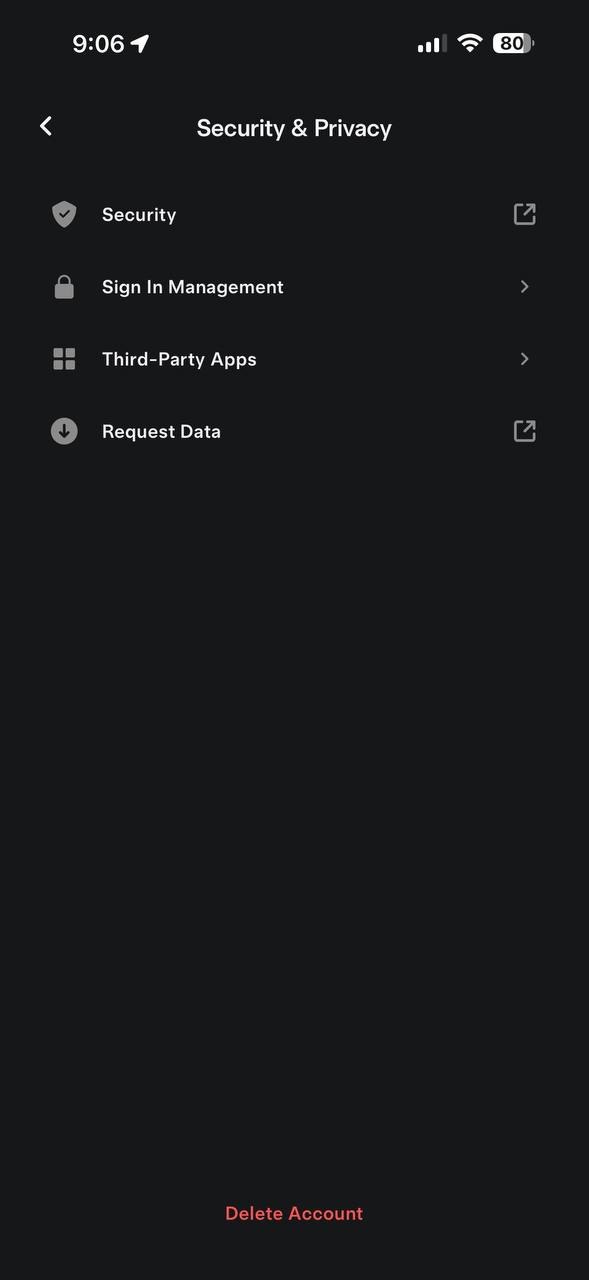
- Appuyez sur Sécurité et confidentialité.
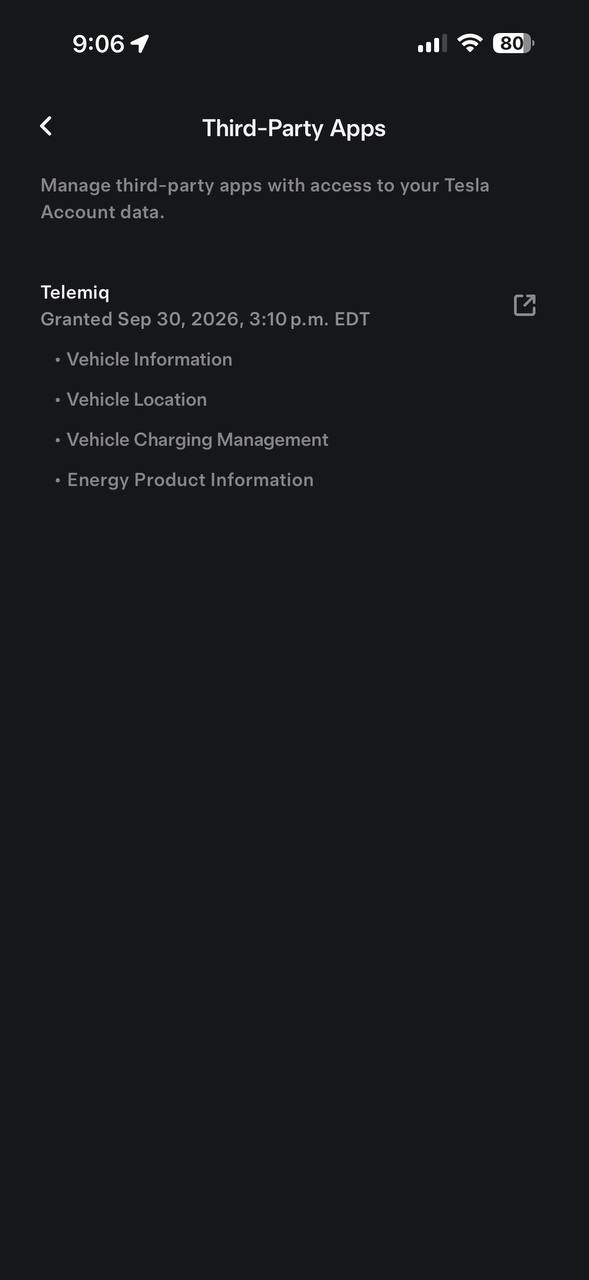
- Appuyez sur Applications tierces — la liste de toutes les applications connectées à votre compte Tesla.
- Trouvez Telemiq et appuyez sur l’icône ⧉ sur sa ligne — elle ouvre la page de gestion Tesla, où vous voyez exactement ses accès (Informations du véhicule, Position du véhicule, Gestion de la charge du véhicule, Informations sur les produits énergétiques) et pouvez les mettre à jour ou les retirer à tout moment.
Sur le web (alternative)
- Allez à tesla.com/fr_ca → Paramètres du compte → Sécurité → Applications tierces.
- Trouvez Telemiq dans la liste et cliquez sur Gérer.
Puis reconnectez-vous dans Telemiq
Revenez dans Telemiq (Paramètres → Connexion Tesla → Reconnecter Tesla) et reconnectez-vous avec TOUTES les cases cochées. Tesla met en cache les sessions — une reconnexion sans mise à jour préalable peut réutiliser silencieusement vos anciennes permissions.
Que se passe-t-il si j’ai plusieurs Tesla ?
Oui — Telemiq prend en charge plusieurs véhicules sur un même compte. Connectez toutes les Tesla de votre compte Tesla : chacune est suivie individuellement et chaque séance de recharge domiciliaire vérifiée de chaque véhicule rapporte des récompenses. Les foyers multi-véhicules n’ont besoin que d’un seul compte Telemiq. Remarque : la clé virtuelle de télémétrie (recommandée pour une détection plus rapide, requise pour les utilisateurs de Mobile Connector) doit être approuvée individuellement pour chaque véhicule dans l’application Tesla.
Qu’est-ce que la vérification par géorepère ?
La vérification par géorepère est notre façon de confirmer que vos sessions de recharge ont lieu à votre adresse domiciliaire enregistrée. Quand vous rechargez, nous comparons les coordonnées GPS de votre Tesla avec votre lieu de domicile au moyen de la formule de Haversine. Les sessions qui tombent dans le rayon du géorepère (500 m) sont admissibles aux récompenses.
Comment définir mon lieu de domicile ?
Pendant la configuration, on vous demandera de définir votre lieu de domicile en saisissant votre adresse ou en plaçant un repère sur une carte. Ce point devient le centre de votre géorepère. Vous pouvez mettre à jour votre lieu de domicile en tout temps via Paramètres > Lieu de domicile si vous déménagez ou devez l’ajuster.
Que se passe-t-il si je recharge chez un ami ?
Non — les sessions hors de votre géorepère domiciliaire (500 m) ne gagnent pas de points. En vertu du Règlement sur les carburants propres du Canada, les crédits carbone ne peuvent être générés que pour la recharge vérifiée à votre adresse résidentielle enregistrée. Cela inclut la maison d’un ami, le travail ou toute borne Level 2 publique loin du domicile. Seules les recharges dans votre géorepère domiciliaire gagnent des récompenses.
Que se passe-t-il si je déménage ?
Mettez simplement à jour votre lieu de domicile dans les paramètres de l’appli. Votre nouvelle adresse deviendra le centre du géorepère à partir de ce moment. Les sessions précédentes à votre ancienne adresse déjà vérifiées demeurent créditées à votre compte. Il n’y a aucune pénalité pour un déménagement.
Telemiq suit-il la position de ma voiture 24 h/24 ?
Non. Telemiq ne fait pas de suivi GPS continu. Les données de position du véhicule sont reçues de Tesla Fleet Telemetry au maximum toutes les 15 minutes, et seulement quand le véhicule est éveillé. Voici ce qui se passe réellement : (1) En conduite — le véhicule est éveillé, donc Tesla peut envoyer des coordonnées GPS toutes les 15 minutes. Cependant, Telemiq DÉTRUIT immédiatement tout GPS reçu quand le véhicule n’est pas en recharge active — il n’est jamais stocké dans notre base de données ni en mémoire serveur. (2) Stationné et en veille — le véhicule entre en mode veille dans les 10 à 15 minutes après le stationnement. Tesla cesse TOUTE transmission de télémétrie. Rien n’est envoyé — ni GPS, ni données. (3) En recharge — le véhicule est éveillé, le GPS est reçu toutes les 15 minutes, et ces données SONT conservées car elles servent de preuve que la recharge a eu lieu à votre adresse domiciliaire enregistrée pour la conformité aux crédits carbone. Les seules données GPS que nous gardons sont celles des sessions de recharge active. Nous ne construisons jamais d’historique de positions, ne suivons jamais d’itinéraires et ne savons jamais où va votre voiture. Voir la section 2.8 de notre politique de confidentialité pour tous les détails techniques.
Pourquoi avez-vous besoin de mon GPS ?
La position GPS pendant la recharge est une exigence réglementaire en vertu du Règlement sur les carburants propres (RCP) du Canada. Des crédits carbone ne peuvent être émis que pour une recharge vérifiée comme ayant eu lieu à l’adresse domiciliaire enregistrée du participant. La coordonnée GPS enregistrée pendant votre session de recharge est la preuve d’audit qu’un vérificateur d’ECCC ou un auditeur tiers examinerait pour confirmer que la recharge a eu lieu à domicile — pas à un Superchargeur, au travail ni à une borne publique. Sans cette preuve de position, aucun crédit carbone ne peut être généré et aucune récompense ne peut être versée. Les données GPS sont conservées 7 ans dans le cadre de la piste d’audit de conformité, tel qu’exigé par la réglementation fédérale.
Qu’arrive-t-il à mes données GPS quand je ne recharge pas ?
Elles sont immédiatement détruites. Notre serveur utilise un système de protection de la vie privée à trois couches : (1) ABANDON — quand une coordonnée GPS arrive et que le véhicule n’est pas en recharge (aucun flux d’énergie, aucun état de charge), la donnée est rejetée instantanément avant d’atteindre notre base de données ou la mémoire serveur. (2) PORTE — le GPS n’est stocké en mémoire temporaire du serveur que si des signaux de recharge sont détectés simultanément, empêchant la capture des positions de conduite. (3) PURGE — tout état résiduel du véhicule en mémoire est automatiquement supprimé toutes les 5 minutes si aucune activité de recharge n’a eu lieu au cours des 30 dernières minutes. Résultat : zéro donnée de position hors recharge n’est jamais stockée. Nous ne savons pas où vous conduisez, ni où vous stationnez. Le seul lieu que nous conservons est la coordonnée de votre session de recharge.
Comment encaisser mes points ?
Vous pouvez échanger vos points de recharge une fois que les crédits carbone associés ont été vérifiés et approuvés par l’autorité réglementaire compétente, ce qui se produit au T1 de l’année suivante. Allez à la section Portefeuille et touchez « Échanger » pour demander votre transfert Interac.
Quel est le montant minimal de retrait ?
Le rachat minimal est de 10 000 points de recharge à domicile (100,00 $ CA). Seuls les points gagnés par de vraies sessions de recharge comptent vers ce seuil — les bonus de parrainage et crédits promotionnels sont verrouillés jusqu’à ce que vous atteigniez 10 000 points de recharge. Une fois le seuil atteint, tous vos points peuvent être rachetés ensemble par transfert Interac après l’audit annuel des crédits carbone du T1 (janvier–mars) en vertu du Règlement sur les carburants propres du Canada.
Combien de temps prend un transfert Interac ?
La plupart des transferts Interac sont traités en 1 à 3 jours ouvrables. Une fois traité, vous recevrez un courriel d’Interac avec les instructions pour déposer les fonds dans votre compte bancaire. Le dépôt réel est généralement instantané après acceptation du transfert.
Y a-t-il des frais de retrait ?
Non, il n’y a aucun frais pour retirer vos gains. Le montant intégral de votre demande vous est envoyé par transfert Interac. Telemiq assume tous les coûts de traitement des transactions.
Quelle adresse courriel utiliser pour Interac ?
Utilisez l’adresse courriel associée à votre compte bancaire canadien qui accepte le dépôt automatique des transferts Interac. Si votre banque n’a pas de dépôt automatique configuré, vous recevrez une question et réponse de sécurité au courriel fourni. Assurez-vous que le courriel est exact pour éviter les délais.
Pourquoi ne puis-je pas racheter mes points immédiatement ?
Les points sont liés aux crédits carbone en vertu du Règlement sur les carburants propres du Canada. L’autorité réglementaire vérifie et approuve ces crédits au T1 de l’année suivante. Une fois vérifiés, vos points deviennent disponibles au rachat. Ce cycle annuel assure la conformité aux règles fédérales d’agrégation de crédits carbone.
Quand a lieu la vérification annuelle ?
L’audit des crédits carbone a lieu au T1 (janvier–mars) de chaque année. Une fois que l’autorité réglementaire termine son examen et approuve les crédits, vos points vérifiés seront disponibles au rachat. Vous recevrez une notification quand vos points sont vérifiés.
Quelle est la différence entre points en attente et points vérifiés ?
Les points en attente sont gagnés par vos sessions de recharge tout au long de l’année. Ils apparaissent dans votre solde mais ne peuvent pas encore être rachetés. Les points vérifiés ont été confirmés par l’audit annuel des crédits carbone du T1 (janvier–mars de l’année suivante) et sont disponibles au rachat par transfert Interac.
Comment fonctionne le programme de parrainage ?
Partagez votre code de parrainage unique avec vos amis. Quand ils s’inscrivent et saisissent votre code dans les 5 jours ouvrables suivant la création de leur compte, le lien de parrainage est établi. Dès qu’ils accumulent 200 kWh de recharge à domicile vérifiée, vous recevez tous les deux un bonus de 10,00 $ CA (1 000 points chacun). Il n’y a pas de limite au nombre de personnes que vous pouvez parrainer — plus il y en a, mieux c’est.
Comment saisir un code de parrainage ?
Vous pouvez saisir un code de parrainage de deux façons : (1) Pendant l’inscription, via le lien de parrainage partagé par votre ami, ou (2) Après vous être inscrit, dans la section « Code promotionnel ou de parrainage » de votre tableau de bord Telemiq. Le code doit être saisi dans les 5 jours ouvrables suivant la création de votre compte pour être admissible au bonus de parrainage des nouveaux comptes.
Qu’est-ce que la règle des 5 jours ouvrables ?
Pour être admissible au bonus de parrainage, vous devez saisir un code de parrainage dans les 5 jours ouvrables suivant la création de votre compte. Seuls les jours ouvrables comptent (lundi–vendredi, fins de semaine et jours fériés exclus). Si vous saisissez un code après cette fenêtre, le lien de parrainage est quand même enregistré, mais votre compte est marqué « compte existant » et n’est pas admissible au bonus de parrainage. Cette règle existe pour garantir que les parrainages proviennent de véritables nouveaux utilisateurs.
Puis-je utiliser à la fois un code promo et un code de parrainage ?
Non, vous ne pouvez utiliser qu’un seul code — soit un code promotionnel (comme Welcome500), soit un code de parrainage. Une fois l’un des deux racheté, le champ de saisie est définitivement retiré de votre tableau de bord. Choisissez celui qui vous avantage le plus.
Quand recevons-nous le bonus de 5 $ ?
Le bonus de 10,00 $ CA est crédité à vous et à votre filleul dès qu’il atteint 200 kWh de recharge à domicile vérifiée — généralement quelques semaines de recharge régulière. Vous recevrez tous deux une notification quand le bonus est appliqué à vos soldes.
Y a-t-il une limite de parrainages ?
Non, il n’y a pas de limite au nombre de personnes que vous pouvez parrainer ni au nombre de bonus que vous pouvez gagner. Chaque parrainage admissible rapporte 5,00 $ CA à vous et à votre ami. Cependant, chaque personne ne peut être parrainée qu’une seule fois, et l’auto-parrainage n’est pas permis.
Puis-je parrainer des non-propriétaires de Tesla ?
Le programme de parrainage est conçu pour les propriétaires de Tesla puisque Telemiq exige un véhicule Tesla connecté. Si une personne que vous parrainez ne possède pas de Tesla, elle ne pourra pas terminer la configuration et le parrainage ne sera pas admissible au bonus.
Qu’est-ce qui compte vers le seuil de 200 kWh ?
Seules les sessions de recharge à domicile vérifiées comptent vers le seuil de parrainage de 200 kWh. Les sessions hors domicile n’y contribuent pas. Le filleul doit accumuler 200 kWh de recharge à domicile admissible pour déclencher le bonus.
J’ai parrainé mon ami mais je n’ai pas reçu le bonus. Pourquoi ?
Les bonus de parrainage sont crédités après que votre ami s’est inscrit, a saisi votre code dans les 5 jours ouvrables et a complété 200 kWh de recharge à domicile vérifiée. Raisons fréquentes de non-réception : votre ami a saisi le code après la fenêtre de 5 jours ouvrables, il n’a pas utilisé votre code exact, ou il n’a pas encore atteint 200 kWh. Contactez-nous à [email protected] et nous enquêterons.
Comment fonctionnent les codes promotionnels ?
Les codes promotionnels (comme Welcome500) donnent un bonus de points instantané quand ils sont rachetés sur votre tableau de bord. Chaque code ne peut être utilisé qu’une fois par compte. Après le rachat, le champ de saisie est définitivement retiré. Les codes promotionnels ne peuvent pas être combinés avec des codes de parrainage — vous devez en choisir un.
J’ai déjà racheté Welcome500. Puis-je encore utiliser un code de parrainage ?
Non. Une fois un code promotionnel utilisé, le champ de saisie est définitivement retiré et vous ne pouvez plus saisir de code de parrainage. De même, si vous avez déjà utilisé un code de parrainage, vous ne pouvez pas racheter de code promotionnel. Vous ne pouvez utiliser qu’un seul code au total par compte.
Les récompenses sont-elles imposables ?
Les récompenses gagnées via Telemiq peuvent être considérées comme un revenu imposable en vertu du droit fiscal canadien. L’Agence du revenu du Canada (ARC) traite divers types de récompenses et d’incitatifs différemment selon les circonstances. Nous recommandons de consulter un professionnel fiscal qualifié pour un conseil adapté à votre situation.
Vais-je recevoir un relevé T4A ?
Telemiq peut émettre des relevés T4A pour les utilisateurs admissibles, tel qu’exigé par la réglementation de l’ARC. Si un T4A est émis, il vous sera envoyé avant la date limite prescrite. Nous vous aviserons à l’avance si vous en recevrez un. Tous les utilisateurs ne recevront pas nécessairement un T4A — cela dépend du montant total gagné.
Comment déclarer cela dans mes impôts ?
Vous êtes responsable de déclarer vos gains Telemiq conformément aux exigences de l’ARC. Si vous recevez un T4A, incluez-le avec votre déclaration de revenus tel qu’indiqué. Si vous ne recevez pas de T4A mais avez gagné des récompenses, consultez un professionnel fiscal pour savoir si et comment déclarer ce revenu.
Qu’est-ce que les crédits carbone ?
Les crédits carbone sont des certificats négociables représentant une réduction d’émissions de gaz à effet de serre. En vertu du Règlement sur les carburants propres (RCP) du Canada, l’électricité utilisée pour recharger des véhicules électriques génère des crédits car elle déplace la consommation de carburants fossiles. Ces crédits peuvent être vendus à des entreprises devant atteindre des cibles réglementaires de conformité.
Pourquoi Telemiq les collecte-t-il ?
Les propriétaires individuels de VE ne peuvent pas accéder au marché des crédits carbone par eux-mêmes — cela exige une infrastructure d’agrégation, de vérification et de déclaration. Telemiq agrège les données de recharge de notre communauté pour générer des crédits conformes au RCP grâce à l’enregistrement de Telemiq comme exploitant de réseau de recharge auprès d’ECCC, et monétise ces crédits. Les revenus financent vos récompenses et gardent la plateforme gratuite.
Comment cela aide-t-il l’environnement ?
En récompensant la recharge à domicile, Telemiq incite à l’adoption des VE et à la conduite électrique. Chaque kWh rechargé à domicile à partir du réseau électrique déplace la consommation d’essence. À un taux de 0,404 kg CO2 par kWh (méthodologie de déplacement — tient compte de la réduction complète du CO₂ du puits à la roue du remplacement de l’essence par l’électricité), l’impact cumulatif de notre communauté fait une différence mesurable dans les émissions canadiennes de carbone.
Quel est le taux de compensation CO2 ?
Nous utilisons 0,404 kg de CO2 compensé par kWh, une méthodologie de déplacement — la réduction estimée de CO₂ du remplacement de l’essence par l’électricité pour la conduite au Canada, tenant compte des émissions marginales du réseau national, des pertes de transmission et des différences d’efficacité des véhicules. Ce n’est pas le facteur moyen d’émission de production du réseau (qui varie par province, d’environ 30 g/kWh dans les régions hydro/nucléaires à environ 700 g/kWh dans les régions au charbon), mais bien la réduction totale de CO₂ sur le cycle de vie obtenue en conduisant un VE plutôt qu’une voiture à essence. Par exemple, si vous rechargez 50 kWh, cela déplace environ 20,2 kg de CO₂ par rapport à un véhicule à essence.
En tant que propriétaire de borne, pourquoi ne puis-je pas générer mes propres crédits carbone ?
En vertu du Règlement sur les carburants propres du Canada, la recharge résidentielle de VE doit être enregistrée et déclarée par un exploitant de réseau de recharge enregistré. Les propriétaires individuels de bornes résidentielles ne peuvent pas s’enregistrer ni générer des crédits indépendamment dans le programme fédéral. Telemiq est un exploitant de réseau de recharge enregistré auprès d’Environnement et Changement climatique Canada (ECCC). Telemiq agrège vos données de recharge à domicile vérifiées pour générer des crédits conformes au RCP et vous retourne les revenus sous forme de récompenses.
Puis-je m’inscrire si j’ai mon propre site de recharge privé ?
Les propriétaires de sites de recharge privés peuvent être admissibles s’ils contrôlent un site de recharge Tesla compatible pouvant être connecté de façon sécuritaire à Telemiq. Pour vous inscrire comme propriétaire de site privé, contactez-nous à [email protected] avec les détails de votre installation et nous évaluerons votre admissibilité au cas par cas.
Quelle est la logique derrière les crédits carbone et mes récompenses ?
Voici comment votre recharge à domicile se transforme en récompenses : Chaque kWh de recharge à domicile vérifiée déplace environ 0,404 kg de CO₂ (méthodologie de déplacement — tient compte de l’essence non brûlée par la conduite électrique). Cette réduction de CO₂ génère un crédit de conformité en vertu du Règlement sur les carburants propres. Les crédits sont agrégés parmi tous les membres Telemiq et vendus aux fournisseurs de carburant ayant des besoins de conformité. Les revenus financent votre récompense (cinq paliers annuels, 5 à 14,5 pts/kWh de base, jusqu’à 21,75 pts/kWh avec multiplicateur). Pour un membre type rechargeant environ 600 kWh/mois en mode standard : cela donne 2 400 pts/mois gagnés (24 $ CA), environ 242 kg CO₂ compensés par mois, environ 2,9 tonnes CO₂ par année.
Comment mes récompenses sont-elles financées par les ventes de crédits carbone ?
Vos récompenses sont financées en partie par la vente des crédits carbone générés à partir de vos données de recharge à domicile vérifiées. En vertu du Règlement sur les carburants propres du Canada, le prix des crédits carbone fluctue selon l’offre et la demande du marché. Telemiq utilise les revenus des ventes de crédits pour : (1) vous payer pour chaque kWh rechargé (taux de paliers annuels de 5 à 21,75 pts/kWh), (2) couvrir les coûts d’exploitation du programme (infrastructure de vérification, audits de conformité, maintenance de la plateforme, soutien), et (3) réinvestir dans les programmes et événements communautaires. Votre grille de récompenses est fixe et publiée (grille publiée à 5 paliers annuels) indépendamment des prix du marché des crédits — vous n’êtes jamais exposé aux fluctuations du marché.
En quoi Telemiq diffère-t-il de vendre des crédits carbone moi-même ?
Les propriétaires individuels de bornes résidentielles ne peuvent pas participer indépendamment au marché des crédits du RCP. Le règlement exige l’enregistrement comme exploitant de réseau de recharge, des déclarations continues de conformité, la vérification des données par des tiers et des audits annuels — tout cela exige une infrastructure spécialisée et une expertise réglementaire impraticable pour un seul propriétaire. Telemiq fournit cette infrastructure et ce cadre de conformité réglementaire à titre de service. En échange, vous recevez un taux publié garanti (jusqu’à 21,75 pts/kWh selon la grille de paliers annuels), sans le coût, la complexité ni le risque de marché d’une participation au RCP par vous-même. Le compromis : le prix de vente des crédits est généralement supérieur au taux de récompense, mais la différence couvre les coûts opérationnels et réglementaires.
Quelles bornes fonctionnent avec Telemiq ?
Telemiq prend en charge tout l’équipement de recharge CA Tesla : le Wall Connector Gén 3, le Wall Connector Universal et le Mobile Connector. Par la télémétrie Fleet, le système de gestion de batterie de votre Tesla sert de sous-compteur accrédité — même le Mobile Connector produit des données vérifiables prêtes pour audit. Tant que les conditions d’admissibilité sont remplies — Wall Connector enregistré, OU télémétrie appariée avec lieu de domicile défini — et que la session a lieu à votre adresse domiciliaire enregistrée, elle est admissible aux récompenses. Rétrochargement de l’historique : Telemiq importe automatiquement l’historique de recharge de l’année en cours d’un Wall Connector Tesla (Gén 3 ou Universal) connecté en Wi-Fi. Les Wall Connectors Gén 2 sans Wi-Fi ne peuvent pas être rétrochargés — ils ne gardent aucun historique infonuagique — mais ils gagnent quand même des récompenses en appariant la clé virtuelle de télémétrie avec votre véhicule. ⚠️ Important : si vous utilisez une borne non Tesla (ChargePoint, FLO, Grizzl-E, etc.) offrant son propre programme de crédits carbone ou de rabais d’énergie propre, votre fournisseur de borne a peut-être déjà réclamé des crédits carbone pour vos sessions. Les mêmes données de recharge ne peuvent pas être réclamées par deux programmes — vous devez confirmer que votre borne ne réclame pas indépendamment des crédits carbone avant de vous inscrire à Telemiq. Voir l’entente de recharge pour les conditions complètes.
Telemiq peut-il importer (rétrocharger) mon historique de recharge passé ?
Oui — si vous avez un Tesla Wall Connector (Gén 3 ou Universal) connecté en Wi-Fi. À l’enregistrement de votre Wall Connector, Telemiq importe automatiquement son historique de recharge de l’année civile en cours directement de Tesla et récompense ces sessions comme si elles avaient été suivies en direct. Les Wall Connectors Gén 2 sans Wi-Fi ne peuvent pas être rétrochargés : l’appareil ne garde aucun historique infonuagique, il n’y a donc rien à importer. Les propriétaires de Gén 2 peuvent quand même gagner — appariez la clé virtuelle de télémétrie avec votre véhicule, et chaque session de recharge à domicile vérifiée à partir de ce moment gagne des points selon la grille en vigueur (grille de paliers annuels publiée). Dorénavant, toute borne murale gagne via l’appariement de télémétrie ; seul le rétrochargement automatique de l’historique exige un Wall Connector Gén 3 ou Universal.
Pourquoi ma session a-t-elle été signalée ?
Les sessions peuvent être signalées par notre système de détection d’anomalies pour plusieurs raisons : coordonnées GPS hors de votre géorepère, motifs inhabituels de livraison d’énergie, sessions superposées ou incohérences de données. Une session signalée ne signifie pas toujours une fraude — cela indique seulement que notre système doit vérifier les données. Vous pouvez faire appel si vous croyez qu’elle a été signalée à tort.
Que faire si mes données de recharge semblent erronées ?
Si vous remarquez des écarts dans vos données de recharge ou vos récompenses, contactez-nous à [email protected] avec les détails de la session. Nous pouvons examiner les données brutes de l’API Tesla Fleet et corriger toute erreur. Les problèmes de données sont rares mais peuvent survenir en raison de délais d’API ou d’erreurs de synchronisation.
À quelle fréquence les données sont-elles synchronisées depuis mon Tesla ?
Les données de recharge se synchronisent automatiquement via l’API Tesla Fleet, généralement quelques minutes après la fin d’une session. Pendant les fenêtres de maintenance de Tesla ou des problèmes de réseau, des délais sont possibles. Si des données n’apparaissent pas dans les 24 heures suivant une session, contactez le soutien.
Comment supprimer mon compte ?
Vous pouvez demander la suppression de votre compte via les paramètres de l’appli ou en nous écrivant à [email protected]. À la suppression, nous effacerons définitivement vos jetons OAuth Tesla, déconnecterons votre véhicule et supprimerons vos données personnelles conformément à notre échéancier de rétention des données.
Qu’arrive-t-il aux récompenses en attente ?
Si vous avez un solde de 10 000 points vérifiés (100,00 $ CA) ou plus au moment de la suppression, nous recommandons de racheter avant de procéder. Les points non vérifiés (ceux non confirmés par l’audit annuel des crédits carbone du T1) et les soldes sous le seuil minimal de 10 000 points seront confisqués à la suppression du compte, car nous ne pouvons pas traiter de transferts Interac pour des soldes non vérifiés ou insuffisants.
Puis-je me réinscrire après avoir supprimé mon compte ?
Oui, vous pouvez créer un nouveau compte Telemiq en tout temps. Cependant, votre historique de récompenses, vos registres de transactions et vos liens de parrainage précédents ne pourront pas être restaurés. Vous repartirez à zéro comme nouvel utilisateur. Notez que tout code de parrainage de votre compte précédent ne sera plus actif.
Comment me retirer du programme ?
Le retrait est offert sur demande — écrivez-nous à [email protected] depuis votre adresse courriel enregistrée et nous vous enverrons un lien de retrait sécurisé avec les détails. La demande prend effet au début de la prochaine année civile, après le versement des points et rabais de fin d’année. Si votre compte n’a aucun historique de recharge, vos données personnelles sont effacées définitivement; s’il en a un, seuls les registres nécessaires au signalement du retrait sont conservés, et vous êtes libre de rejoindre un autre fournisseur.
Commencez à gagner dès votre prochaine recharge
Inscrivez-vous gratuitement avec votre compte Tesla — les points apparaissent automatiquement après chaque session. Des questions ? Écrivez à [email protected].